
Features
Every automatic choice is a starting point.
Zoomingscreen places the zooms for you, then gives you a simple editor to make the video exactly right: cut, reframe, add music and export in the size you need.
Auto zoom on every click
The heart of Zoomingscreen. It sees where you click and moves the camera there for you.
- Zoom per click
- Each click gets a gentle zoom, timed so it is in place as the click happens.
- Smooth glides
- Clicks close together become one glide instead of a jumpy zoom out and in.
- Click rings
- A soft ring on every click, so viewers never miss one. Turn it off in one click.
- Clicks in sync
- Clicks are lined up with the video to within a frame or two, checked on real recordings.
An editor that stays out of the way
Zooms, cuts and framing are laid over your original recording. Change anything, undo anything.
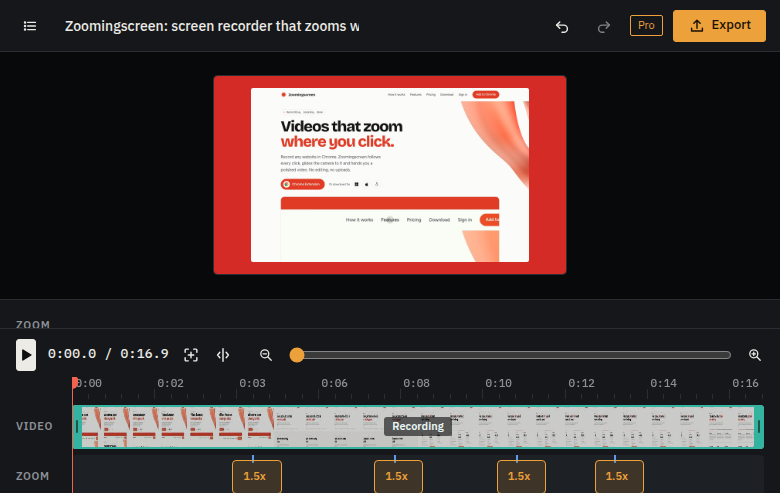
- Zoom timeline
- Drag zooms to move them, pull their edges to change length, double click to add one.
- Aim box
- Drag a box over the full frame to choose exactly what a zoom shows, scroll to go closer.
- Split and delete
- Split at the playhead with S, delete the parts you do not want, restore them any time.
- Trim
- Drag the ends of the recording to cut a slow start or a long goodbye.
Music and sound
Give a demo some life without hunting for music or worrying about licenses.
- Music included
- Tracks that come with Zoomingscreen, all CC0, free to use in any video, even commercial ones.
- Your own music
- Add any music file of your own and it loops under the video.
- Two volumes
- Set the music and your recording’s own sound separately. Music fades out at the end.
- Microphone
- Talk over your recording as you go. Chrome asks for the microphone once.
Shape and background
Made for wherever the video goes, from a landing page to a phone screen.
- Any shape
- 16:9, 9:16, square, 4:5, 4:3 or the recording’s own shape.
- Backgrounds
- Calm colors, soft blends, any color you pick, or your own image, with blur.
- No background
- Or skip it: export just the video itself, edge to edge.
- Padding and corners
- Set how much room the video gets and how round its corners are.
Export
Made on your computer with its own video hardware. No upload, no waiting in a queue.
- MP4 and WebM
- At 24, 30 or 60 frames a second, in three quality levels.
- Up to 4K
- Free exports go up to 1080p. Pro unlocks 1440p and 4K.
- GIF
- For short loops in docs, tickets and chats.
- Large files, no trouble
- Exports stream straight to disk, so a long 4K video does not fill memory.
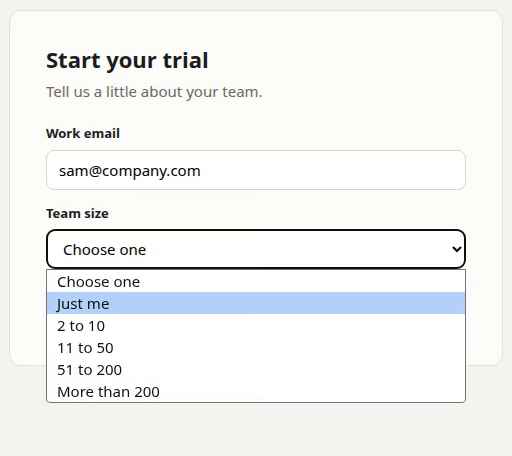
Dropdowns and forms show up too.
Chrome draws a website's dropdown lists outside the page, where screen recorders cannot see them. While you record, Zoomingscreen opens them inside the page, so your viewers see exactly what you picked. Your own cursor is recorded as it was, and grows with every zoom.
Also on your desktop.
The Zoomingscreen desktop app for macOS, Windows and Linux records a whole screen or a single window. On a whole screen it follows your clicks in every app, not just the browser. Same editor, same exports, and one Pro key works in either. Download the desktop app.