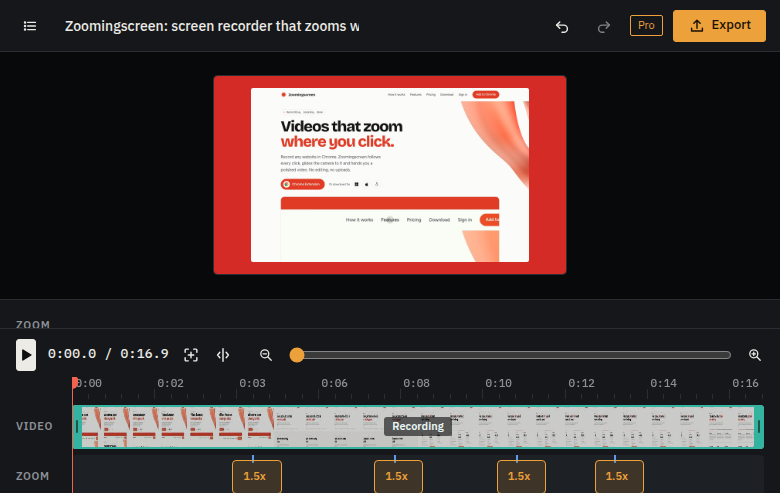
How it works
You use the site. It does the editing.
Most of the work in a product video is zooming into the right spot at the right moment. Zoomingscreen already knows where that is, because it saw you click there.
Press record
Click the Zoomingscreen icon on any website and press Start, or pick a screen or window in the desktop app. Use it the way you would with a customer watching. There is no script to write and no timeline to plan.
It notes every click
While you record, Zoomingscreen notes each click, selection and typing moment, with its exact place on screen and its time. Nothing you type is read, only where and when you clicked.
The camera follows
When you stop, each click already has a gentle zoom. Quick clicks close together become one smooth glide, far apart clicks ease out and back in, so the viewer always knows where they are.
Trim, split and add music
Cut the start and end, split out a mistake and delete it, move or aim any zoom, and lay music underneath. Every change can be undone, the original recording is never touched.
Pick a look
Choose a shape for where the video will be shown, 16:9, 9:16, square and more, with a background, padding and rounded corners. Or no background at all, just the video itself.
Export and share
Export MP4 or WebM at up to 60 frames a second, or a GIF for a quick loop. The video is made on your computer with its own video hardware, then it is yours to post anywhere.
See it on a real recording.
This video is this website, recorded with the Zoomingscreen extension and exported with no other editing. Every zoom you see was placed from a click.
Why zooms follow clicks.
A viewer watching a full screen recording has to hunt for what changed. A zoom on each click shows them at once, and a glide between clicks keeps them oriented. Doing that by hand takes an editor and an afternoon. Zoomingscreen does it the moment you stop recording, and you only change what you want to.