
Videos that zoom where you click.
Record any website in Chrome and get a polished video that zooms to every click.
How it works
You use the site. It does the editing.
Most of the work in a product video is zooming into the right spot at the right moment. Zoomingscreen already knows where that is, because it saw you click there.
Press record
Click the Zoomingscreen icon on any website and press Start. Use it the way you would with a customer watching.
It reads your clicks
Every click, selection and typing moment is noted with its exact place on screen and its time.
The camera follows
Each click gets a gentle zoom. Quick clicks across the page become one smooth glide.
Tweak and export
Cut what you do not need, add music, pick a background or none, then export MP4, WebM or GIF.
What you record is yours. Your recordings and exports stay on your own computer. We never upload, store or host your videos, so nobody else sees them and you can use them anywhere you like.
The editor
Every automatic choice is a starting point.
Zooms, cuts, music and framing are laid over your original recording. Change anything, undo anything, nothing is ever burned in.
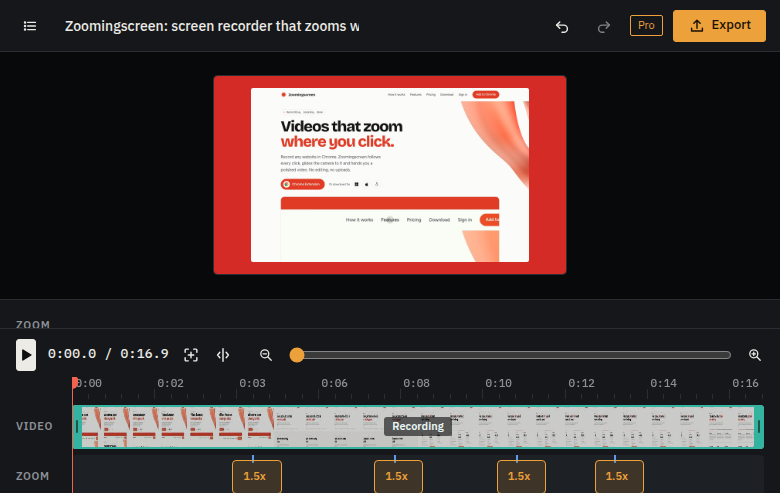
Every feature: split and delete, music, backgrounds, 4K export
Real websites
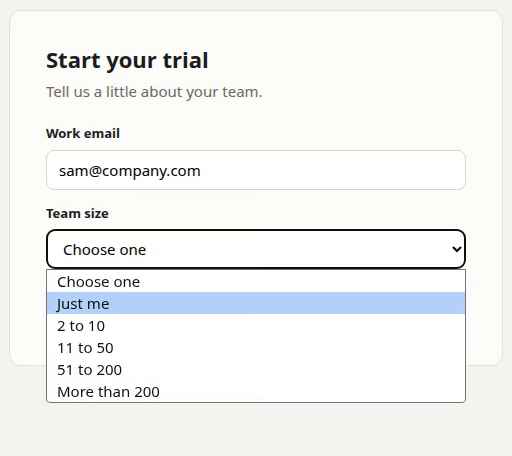
Dropdowns and forms show up too.
Chrome draws a website's dropdown lists outside the page, where screen recorders cannot see them. While you record, Zoomingscreen opens them inside the page, so your viewers see exactly what you picked.
- Your own cursorRecorded as it was, and larger with every zoom.
- Click ringsA soft ring on every click, so viewers never miss one.
- Clicks in syncClicks are lined up with the video to within a frame or two.
Private by design
Your video is recorded, edited and exported on your computer.
It is never uploaded to us. No analytics, no tracking pixels. Zoomingscreen only talks to our server to check a Pro license, once a day, and it never reads what you type. Read the privacy policy.
Pricing
Free to use. Pro when it earns its keep.
Every feature works on the free plan. Pro removes the small Zoomingscreen mark from exports and unlocks 1440p and 4K.
Free
- Unlimited recordings
- Auto zoom that follows your clicks
- Split, trim, music and backgrounds
- Exports up to 1080p
- Small Zoomingscreen mark on exports
Pro, monthly
- No mark on exports
- Up to 4K
- Extension and desktop app
- Cancel any time
Pro, lifetime
- Everything in Pro
- Pay once, keep it
- Updates included
- Your own key for your computer
Compare Free and Pro. Payments are handled by Polar, who also take care of sales tax and invoices.
Questions
Things people ask first.
Where are my recordings kept?
On your computer only. They are never uploaded to us, and you can delete any recording from the Zoomingscreen library.
Can I cut out parts and add music?
Yes. Split the recording, delete what you do not want, and add one of the included tracks or your own music.
Can I use my key on more than one computer?
Your key works on one computer. Move it to a new one from your account page, once a month.